Classroom noise monitor
Published: · Last updated:
Set an activity limit and watch silent noise alerts. No audio recorded.
Silent visual alerts only — no alarm sound. Audio is analysed on this device and never recorded or uploaded. “Too loud” shows only after the level stays above the limit for 1.5 seconds, so a dropped book does not trigger it.
A free decibel meter for classroom use. Project this page on the board and let the noise meter show the room how loud it is. It runs in the browser, needs no install or account, and no audio is recorded or sent anywhere. Pick an activity, press full screen, and the whole display turns green, amber or red so the class can see the level from the back of the room.
Target levels for classroom activities
| Activity | Workable level |
|---|---|
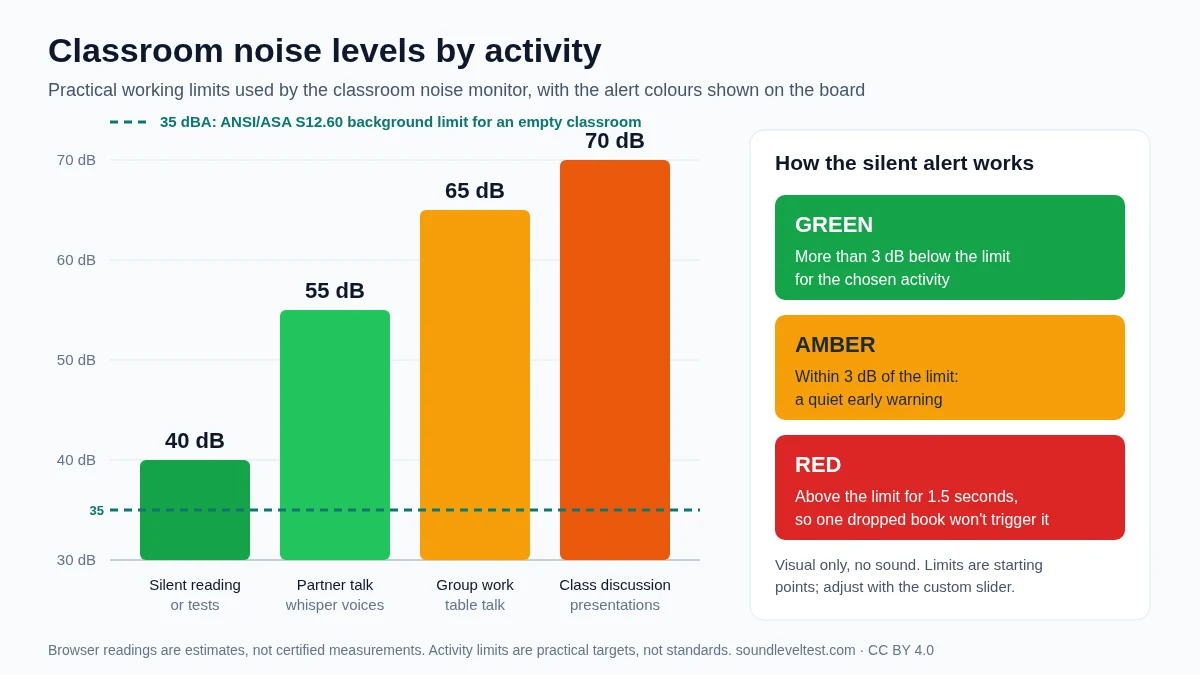
| Silent reading or tests | Under 40 dB |
| Partner work, whisper voices | 40–55 dB |
| Group work, table talk | 55–65 dB |
| Presentations and discussion | 60–70 dB |
Acoustic standards for classrooms (ANSI S12.60) recommend background noise below 35 dBA in unoccupied rooms so speech stays intelligible. Occupied rooms sit higher; the bands above are practical working targets, not standards.
What the ANSI/ASA S12.60 classroom standard says
| Measure | Limit for core learning spaces |
|---|---|
| Background noise, empty room (1-hour average) | 35 dBA |
| Reverberation time, rooms up to 283 m³ (10,000 ft³) | 0.6 s |
| Reverberation time, rooms 283–566 m³ | 0.7 s |
The standard covers the building, not the lesson: it is measured with the room empty, ventilation running and no pupils inside, using a calibrated meter. It exists because children need a clearer signal than adults to follow speech, and because the teacher's voice should stay well above the background. This monitor cannot test compliance. What it can do is show whether the empty room already reads near 35–40 dB on your device, which is a useful hint that fans, a projector or corridor noise are eating into that margin before anyone speaks.
Voice levels 0–4 in decibels
Many schools teach a 0–4 voice level scale. The scale describes how pupils should speak; it does not come with official decibel numbers. The ranges below are approximate guides for a typical room, so you can pick the matching preset and show the class what each level looks like on the meter.
| Voice level | Typical use | Approx. room level | Monitor preset |
|---|---|---|---|
| 0 — Silent | Tests, silent reading | Under 40 dB | Silent reading (40 dB) |
| 1 — Whisper | Partner check-ins | 40–50 dB | Partner talk (55 dB) |
| 2 — Table talk | Small-group work | 50–60 dB | Partner talk or group work |
| 3 — Presenter | Speaking to the whole class | 60–70 dB | Class discussion (70 dB) |
| 4 — Outside | Playground, PE | Above 70 dB | Not for indoor work |
A level 1 whisper rarely registers as its own band on a phone or laptop microphone, because the room's background noise often sits close to 40 dB. Set the custom limit a few decibels above the reading of your quiet room, then use that as the class's whisper target.
Printable classroom voice levels poster
Put the four activity levels and the green, amber and red meanings on the wall next to the board. The poster uses the same limits as the presets above, so what pupils read on the wall matches what the monitor shows.
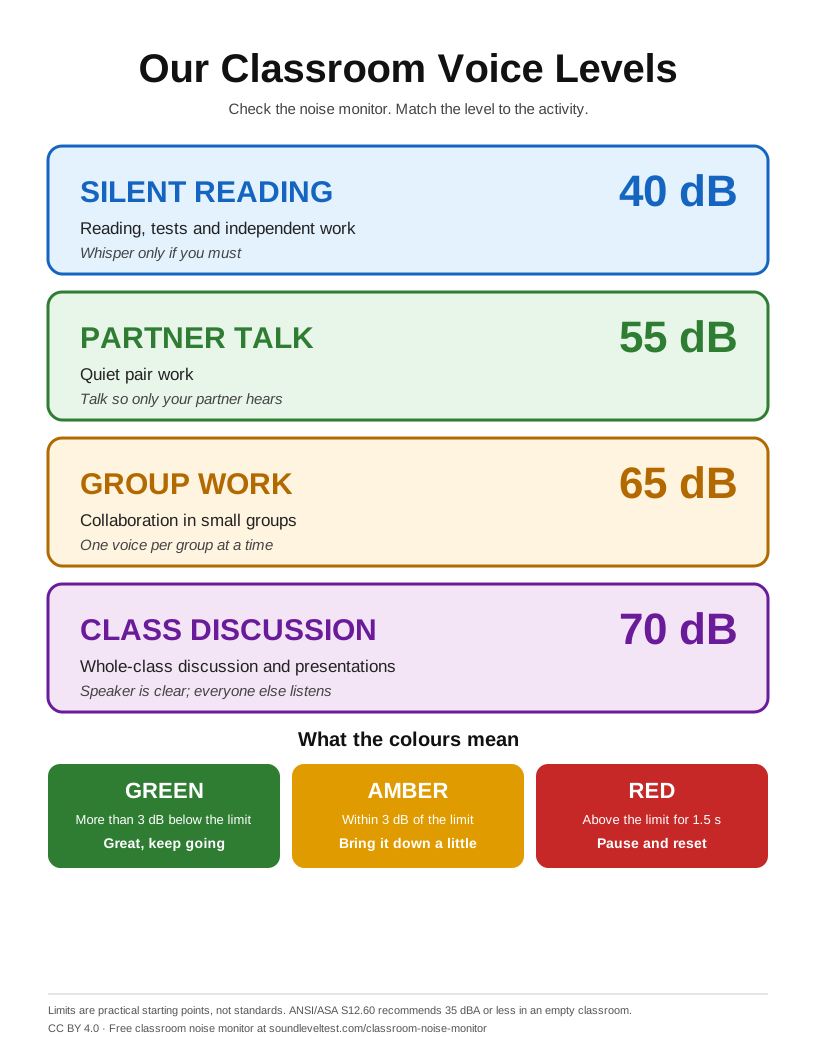
Prints on one Letter or A4 page; use Print or save as PDF. Free under CC BY 4.0.
Tips for using it well
- Place the device away from a projector fan or air vent, which add several decibels.
- Agree the target band with the class before the activity starts, not after.
- Use Reset stats between activities so the average and the over-limit time reflect the current task.
- Use Full screen for the board so the colour is visible from every seat.
- Keep the tab in the foreground — browsers throttle background tabs.
Setting it up on a smartboard, projector or Chromebook
Interactive whiteboards and projectors
Open the page on the computer that drives the board, start the monitor and press Full screen. The level and colour then fill the display, readable from the back row. If the board computer sits beside a loud projector or a fan, the reading will include that hum; a webcam or USB microphone placed nearer the pupils gives a fairer reading than the laptop's built-in microphone.
Chromebooks and school laptops
- Use Chrome and choose Allow when the microphone prompt appears. If you blocked it, click the icon at the left of the address bar to change the setting.
- Keep it plugged in. Power saving can dim the screen or pause the tab during a long lesson.
- Leave the tab in front. Switching to slides in the same window can slow the meter down; a second screen or a separate device works better.
- If the school blocks microphone access, your IT team can allow it for this site only.
Check it before the lesson
With the room empty, start the monitor and note the quiet reading. If it is already close to your chosen limit, move the device away from fans or raise the custom limit a few decibels for that room.
Why silent colour cues work better than alarms
A buzzer or siren adds noise to a room that is already too loud, and it cuts across whoever is speaking — often the pupil who was doing the right thing. Some classes also turn the alarm into a game and set it off on purpose. A colour change avoids all three problems: it is visible without interrupting, and pupils can correct themselves before an adult has to step in.
Silent cues also suit pupils who are sensitive to sudden sounds, including many autistic pupils and those with sensory processing differences. The monitor waits until the level stays above the limit for 1.5 seconds before turning red, so a single laugh or dropped pencil case does not flash a warning at the whole class.
How to run a noise routine that actually works
A live number changes behaviour only when the class knows what the number means. Before an activity, name the band you expect and show it on the meter for a few seconds so everyone hears what that level sounds like in this particular room. During the activity, point at the display rather than raising your own voice; talking over a noisy room pushes the level higher and teaches the class that volume wins.
At the end, reset the statistics and discuss the average rather than the peak. A single chair scrape or laugh can spike the maximum without meaning the group worked loudly, while the average reflects the sustained level the class held. Repeating that short review makes the meter a shared reference instead of a punishment tool.
Why quiet rooms help learning
Speech becomes hard to follow when the background level climbs close to the level of the speaker's voice. Younger pupils, pupils learning in an additional language, and anyone with hearing difficulty or attention difficulty lose more of the sentence than a fluent adult would, because they cannot fill the missing words from context as easily.
Room surfaces matter as much as voices. Bare walls, hard floors and large windows extend reverberation, so sound lingers and overlaps the next word. Soft display boards, curtains, rugs, felt pads on chair legs and closing a door to a corridor often reduce the working level more than repeated reminders do.
Reading the numbers honestly
The reading is an estimate produced by the device microphone, not a certified measurement. Two tablets at the same desk can differ by several decibels, so compare a class against its own earlier sessions on the same device rather than against another classroom. If a decision depends on verified levels — a complaint, an accommodation, or a building assessment — a calibrated meter and a qualified assessor are required. The measurement methodology explains what the estimate can and cannot tell you.
Colour codes and noise management routines
Many teachers pair a class noise meter with simple colour codes: green for independent work, amber for partner talk, red for anything above the agreed band. The bands in the table above map onto that idea without needing bouncy balls, cartoons or a scoreboard — the live number plus an agreed colour is usually enough. Noisy classrooms rarely settle because of a louder adult voice; they settle because the class can see the classroom noise level and knows what is expected.
For a whole-school routine, agree the same bands across classrooms so pupils meet one consistent standard. Compare readings only within the same room and the same device, since different tablets and laptops use different microphones. If you want the underlying reference levels, the decibel chart of everyday sounds shows how 40, 60 and 70 dB sound outside the classroom too.
Questions teachers ask
What is a good noise level for a classroom?
For unoccupied rooms, the ANSI/ASA S12.60 classroom acoustics standard recommends background noise below 35 dBA so speech stays intelligible. Occupied rooms sit higher: roughly under 40 dB for silent work, 40–55 dB for partner talk and 55–65 dB for group work are practical working targets rather than standards.
Is this classroom sound meter free?
Yes. The free classroom noise meter runs in the browser with no account, no install and no subscription. Nothing is recorded and no audio leaves the device.
Where should I place the device?
Put it near the middle of the room at desk height, away from projector fans, air vents and open windows, which can add several decibels on their own. Keep the tab in the foreground, because browsers slow down background tabs.
Does a noise meter for classroom use record pupils?
This one does not. The microphone signal is analysed frame by frame in the browser and discarded immediately, so no audio is stored or uploaded.
How accurate is a browser noise level meter?
It gives an estimate, not a certified measurement. Two devices in the same room can differ by several decibels, so compare a class against its own earlier sessions on the same device rather than against another classroom.
How do I show the noise meter on a smartboard or projector?
Open this page on the computer connected to the board, start the monitor, then press Full screen for the board. The level, the activity name and a green, amber or red background fill the screen. Press Esc or the exit button to return. Some phones, especially iPhones, do not allow full screen; the normal view still works there.
What do the green, amber and red colours mean?
Green means the room is within the limit for the chosen activity. Amber means the level is within 3 dB of the limit. Red appears only when the level stays above the limit for 1.5 seconds, so a single dropped book or chair scrape does not set it off. The alert is visual only and makes no sound.
Can I change the limit for my room?
Yes. The presets are 40 dB for silent reading, 55 dB for partner talk, 65 dB for group work and 70 dB for class discussion. These are practical starting points, not standards. Use the custom slider to raise or lower the limit for a room with loud ventilation, hard surfaces or a different device microphone.
How many decibels is each classroom voice level?
The 0–4 voice level scale has no official decibel values. As a rough guide in a typical room: level 0 (silent) under 40 dB, level 1 (whisper) 40–50 dB, level 2 (table talk) 50–60 dB, level 3 (presenter) 60–70 dB and level 4 (outside voice) above 70 dB.
Does the classroom noise meter work on a Chromebook?
Yes, in Chrome on a Chromebook. Allow the microphone when asked, keep the tab in front and plug the Chromebook in so power saving does not dim the screen or pause the tab during a long lesson.
Why does the monitor use colours instead of an alarm sound?
An alarm adds noise to a room that is already loud and interrupts whoever is speaking. A silent colour change lets pupils notice and adjust on their own, and it is easier on pupils who are sensitive to sudden sounds.