Online sound level meter
Published: · Last updated:
Measure noise in decibels. Free, private, no app needed.
- Minimum
- --
- Average
- --
- Maximum
- --
- Duration
- 0s
Calibration (match a reference meter)
Browsers expose microphone signal level, not absolute sound pressure, so a fixed offset converts the measured signal into an estimated dB SPL value. If you have a calibrated sound level meter or a reference source, adjust the offset until the readings agree. The offset is stored in this browser only.
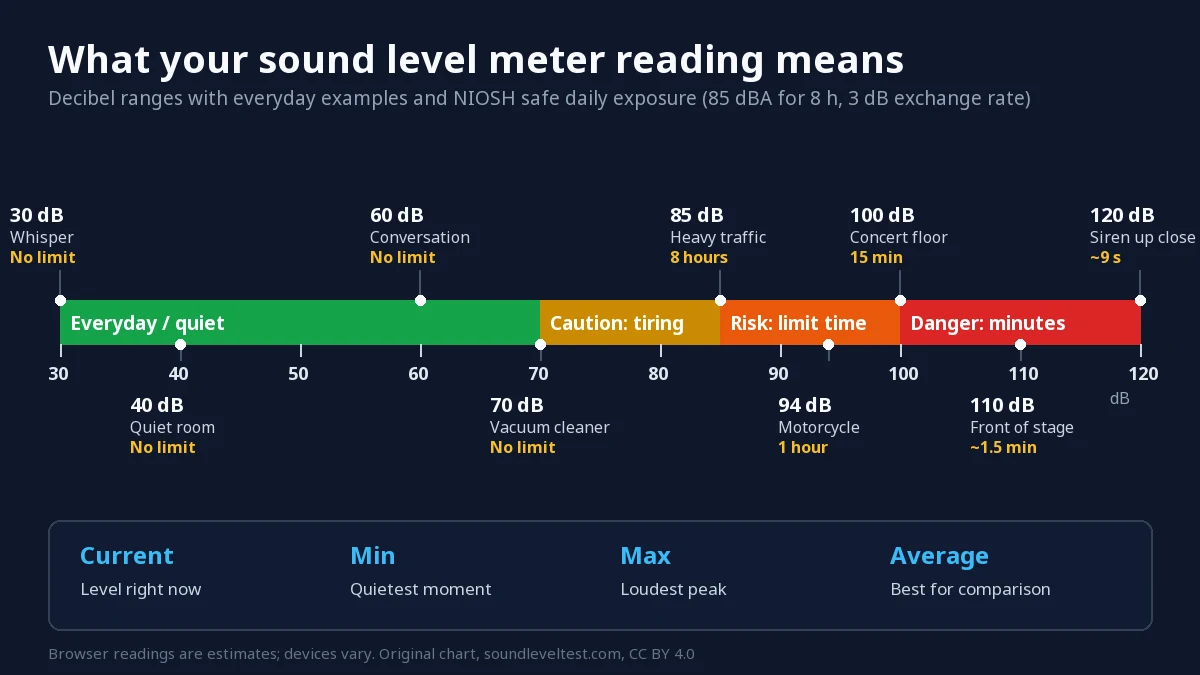
What your reading means
What this tool measures
Your browser gives web pages the microphone signal level, not absolute sound pressure. This noise meter converts that signal to an estimated sound pressure level in decibels using a calibration offset. Built-in microphones and browser audio paths are not calibrated to one universal reference, so readings can vary by device, microphone, distance, orientation, environment and software processing.
The live reading is the current level, and the tool also tracks the minimum, maximum and average so you can see how noise levels rise and fall over a session rather than judging from one instant. That makes it useful for comparing environmental noise between rooms, times of day or before and after a change, using the same device each time.
For legal, occupational or medical decisions, use a calibrated Class 1 or Class 2 meter. This tool is for orientation, comparison and screening.
How to test sound levels
- Select Start measuring and allow microphone access.
- Hold the device at arm's length, pointing the microphone at the sound source.
- Keep fingers, cases and clothing off the microphone port — they can cost 5–10 dB.
- Let it run for at least 30 seconds so the average and maximum stabilise.
- Optionally calibrate against a reference meter to sharpen accuracy.
Questions people ask
Are online decibel meters accurate?
Browser meters provide estimates rather than universally calibrated measurements. Results vary by device, microphone, distance, orientation, environment and software processing. Calibration against a trusted reference can improve comparison on that specific setup, but does not make the browser a professional Class 1 or Class 2 meter.
Does this record my audio?
No. Audio is analysed frame by frame in your browser and discarded immediately. Nothing is saved, uploaded or sent to a server. The only thing stored on your device is your calibration offset.
How many decibels is too loud?
Risk starts around 85 dB sustained across an eight-hour day, and the safe time roughly halves for every additional 3 dB. See the full safe-exposure table.
Why does my reading stay near zero?
The browser may have applied automatic gain control or the microphone may be muted at the system level. Check your input device, disable noise cancellation in your operating system settings, and reload the page.
Does it work on iPhone and Android?
Yes, in Safari on iOS and Chrome on Android, over HTTPS. Mobile browsers require the page to stay in the foreground while measuring.
Is this sound level meter online free?
Yes. The online sound meter is free to use with no account, no install and no limit on how long you measure. Your calibration offset is the only thing saved, and it stays on your device.
How do I measure sound decibels without any equipment?
Open this page, start the meter and hold the device at arm's length with the microphone facing the sound. Let it run for at least 30 seconds and read the average rather than the peak. Treat the number as an estimate for comparison, not a certified measurement.
Can I use it as a classroom or workplace noise meter?
For everyday screening, yes — many people use it to compare environmental noise between rooms or times of day. There is a dedicated classroom noise monitor with target bands for lessons. Formal workplace assessments still require a calibrated meter.